

Automatic Incident Grouping
When a data quality monitor fails, Sifflet minimizes alert fatigue and helps you focus on the root cause of a data problem. Instead of creating a new, isolated incident for every single failure, Sifflet analyzes your data lineage and existing open incidents. If Sifflet finds a relevant incident, it groups the new failure into it.
This page explains the logic behind this feature.
How It Works
When a monitor in Sifflet fails (the "New Failure"), Sifflet performs a multi-step analysis to determine if it should be grouped with an existing issue or if a new incident should be created.
- Look for Recent Incidents: Sifflet searches the most recent open incidents that have had a new failure within the last 7 days.
- Analyze Relationships: It then analyzes the new monitor failure to see if it is related to any of these recent incidents based on two key factors:
- Semantic Match: It checks if the monitor template of the active incident is a compatible match for the monitor template of the new failure, based on their positional relationship (see Grouping Rules below). Not all failures in a lineage are related; for example, a Freshness delay often causes a Volume issue, but a Schema Change is likely unrelated to an Email Format error.
- Data Lineage: Whether the monitors are on the same asset, or on assets connected via upstream, downstream, or sibling lineage, within a maximum lineage depth of 3 hops.
- AI Validation (Relevance Check): Sifflet uses an AI model to validate the potential connection, analyzing the context of both the new failure and the existing incident to confirm if they are truly related.
- Group or Create:
- If Sifflet finds a strong relationship, it adds the new monitor failure to the existing incident.
- If Sifflet finds no related incident, it creates a new incident.
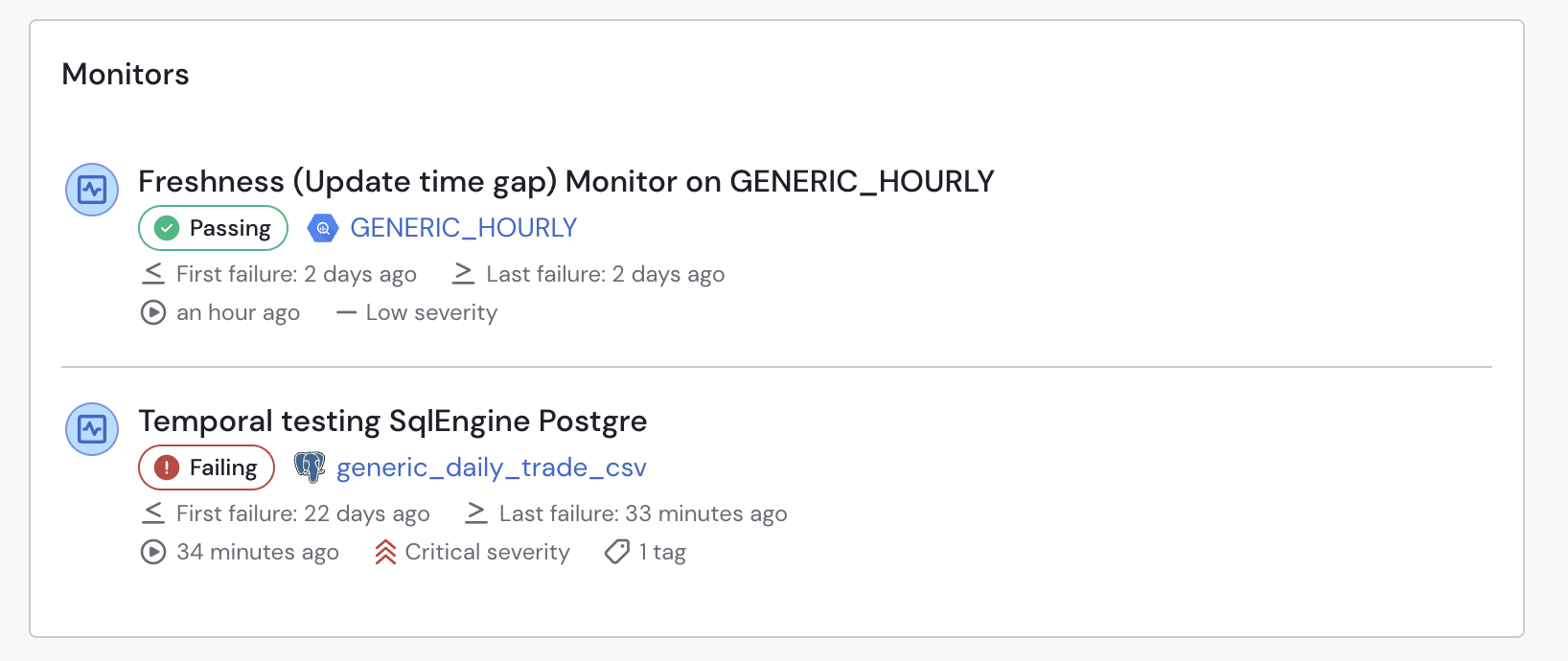
Grouped failing monitors within the incident page.
Notifications when a failure is grouped
When a failure is grouped into an incident that already exists, an incident updated notification is sent to the incident's destinations instead of a new incident notification. See the Notification catalog.
Grouping Rules
Sifflet uses the following logic to determine if monitor failures are related. Grouping is heavily dependent on the monitor template of the new failure and its positional relationship to the monitors already on the existing incident:
- Same Asset — the new failure is on the exact same asset as an existing incident's monitor.
- Upstream Asset — upstream failures that could have caused this incident. Infrastructure failures (Volume, Freshness) are valid causes of almost any downstream failure. For SQL, only infrastructure upstream applies — a business rule failing upstream does not cause your business rule to fail.
- Downstream Asset — downstream failures that are likely effects of this incident. This is more conservative than upstream: business and format monitors downstream are almost always independent.
- Sibling Asset — sibling failures that are likely co-symptoms of the same root cause. Sifflet considers two assets siblings if they share a parent asset of the same type (Dataset), or if they are both root assets (i.e. neither has a parent asset). Infrastructure monitor types have the strongest sibling correlation; format validators and business logic monitors have near-zero sibling correlation.
A new monitor failure is grouped into an existing incident only if the existing incident contains a monitor of one of the compatible templates listed for the corresponding relationship (same asset, upstream, downstream, or sibling), within a maximum lineage depth of 3 hops.
| Monitor Template | Same Asset | Upstream Asset | Downstream Asset | Sibling Asset |
|---|---|---|---|---|
| Volume | Row Duplicate, Freshness, Freshness (Update Timestamp), Duplicates, Unique, Referential Integrity | Volume, Freshness, Freshness (Update Timestamp), Row Duplicate | Volume, Freshness, Freshness (Update Timestamp), Row Duplicate | Volume, Freshness, Freshness (Update Timestamp) |
| Row Duplicate | Volume, Metric, Custom Metrics, Correlated Metrics, Duplicates, Row Duplicate, Unique | Volume, Row Duplicate, Duplicates | Row Duplicate, Duplicates, Unique | Row Duplicate, Duplicates |
| Freshness | Volume, Freshness, Freshness (Update Timestamp) | Volume, Freshness, Freshness (Update Timestamp) | Freshness, Freshness (Update Timestamp), Volume | Volume, Freshness, Freshness (Update Timestamp) |
| Freshness (Update Timestamp) | Volume, Freshness, Freshness (Update Timestamp) | Volume, Freshness, Freshness (Update Timestamp) | Freshness, Freshness (Update Timestamp), Volume | Volume, Freshness, Freshness (Update Timestamp) |
| Schema Change | Duplicates, Unique, Nulls, Referential Integrity | Schema Change | Schema Change, Nulls, Referential Integrity | — |
| Metric | Volume, Row Duplicate, Freshness, Freshness (Update Timestamp), Metric, Custom Metrics, Correlated Metrics, Distribution Changes, Nulls, Value Range, SQL, Conditional Monitoring | Volume, Freshness, Freshness (Update Timestamp), Metric, Correlated Metrics | Metric, Correlated Metrics, Distribution Changes, Custom Metrics | Metric |
| Custom Metrics | Volume, Row Duplicate, Freshness, Freshness (Update Timestamp), Metric, Custom Metrics, Correlated Metrics, Distribution Changes, Nulls, Value Range, SQL, Conditional Monitoring | Volume, Freshness, Freshness (Update Timestamp), Metric, Custom Metrics, Correlated Metrics | Metric, Custom Metrics, Correlated Metrics, Distribution Changes | — |
| Correlated Metrics | Volume, Row Duplicate, Freshness, Freshness (Update Timestamp), Metric, Custom Metrics, Correlated Metrics, Distribution Changes, Nulls, Value Range, SQL, Conditional Monitoring | Volume, Freshness, Freshness (Update Timestamp), Metric, Custom Metrics, Correlated Metrics | Metric, Custom Metrics, Correlated Metrics, Distribution Changes | — |
| Distribution Changes | Volume, Row Duplicate, Freshness, Freshness (Update Timestamp), Metric, Custom Metrics, Correlated Metrics, Distribution Changes, Nulls, Value Range, SQL, Conditional Monitoring | Volume, Distribution Changes | Distribution Changes, Metric, Custom Metrics, Correlated Metrics | Distribution Changes |
| Duplicates | Volume, Metric, Custom Metrics, Correlated Metrics, Duplicates, Row Duplicate, Unique | Volume, Row Duplicate, Duplicates, Unique | Duplicates, Unique, Row Duplicate | Duplicates, Row Duplicate, Unique |
| Unique | Volume, Metric, Custom Metrics, Correlated Metrics, Duplicates, Row Duplicate, Unique | Volume, Row Duplicate, Duplicates, Unique | Duplicates, Unique, Row Duplicate | Duplicates, Unique, Row Duplicate |
| Nulls | Nulls, Schema Change, Metric, Custom Metrics, Correlated Metrics, Distribution Changes, Referential Integrity, SQL, Conditional Monitoring | Schema Change, Nulls, Referential Integrity | Nulls, Schema Change, Referential Integrity | Nulls |
| Value List Validation | Value List Validation, Distribution Changes, Matches Regex, SQL, Conditional Monitoring | Value List Validation | Value List Validation, Distribution Changes | Value List Validation |
| Value Range | Value Range, Distribution Changes, Metric, Custom Metrics, Correlated Metrics, SQL, Conditional Monitoring | Volume, Freshness, Value Range, Distribution Changes | Value Range, Distribution Changes, Metric | Value Range, Distribution Changes |
| Referential Integrity | Volume, Schema Change, Duplicates, Unique, Nulls, SQL, Conditional Monitoring | Volume, Schema Change, Referential Integrity, Nulls | Referential Integrity, Nulls | Referential Integrity |
| Is an Email | Is an Email, Matches Regex, SQL, Conditional Monitoring | Is an Email, Matches Regex | Is an Email | Is an Email |
| Is a Phone Number | Is a Phone Number, Matches Regex, SQL, Conditional Monitoring | Is a Phone Number, Matches Regex | Is a Phone Number | Is a Phone Number |
| UUID | UUID, Matches Regex, SQL, Conditional Monitoring | UUID, Matches Regex | UUID | UUID |
| Matches Regex | Value List Validation, Is an Email, Is a Phone Number, UUID, SQL, Conditional Monitoring | Is an Email, Is a Phone Number, UUID, Matches Regex, Value List Validation | Matches Regex | Matches Regex |
| SQL | All templates (SQL is a custom catch-all for business-specific logic) | Volume, Freshness, Freshness (Update Timestamp) | SQL | — |
AI-Generated Incident Descriptions
When incidents are automatically grouped or a new monitor is linked to an existing incident, Sifflet uses AI to generate a clear, human-readable description of the incident. This description summarizes the failures and provides context, helping you quickly understand the issue.
Updated 27 days ago