

Incident Management & Feedback Loop Revamp
We are excited to announce a major overhaul of the Incident Details Screen, designed to streamline your investigation workflows and provide clearer context when resolving data quality issues.
Furthermore, we are providing a preview of our upcoming Datapoints Qualifications Revamp. This initiative fundamentally changes how you provide feedback to our Machine Learning models, moving toward a dual-status system that separates model training from operational resolution.
1. New Incident Details Experience (Available Now)
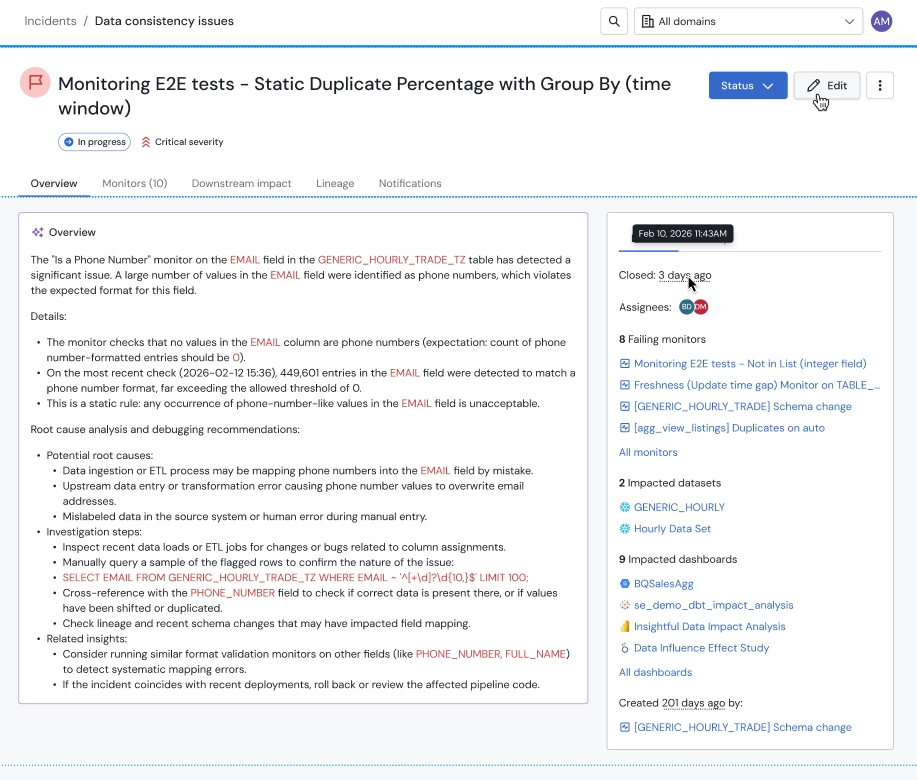
The revamped incident screen prioritizes information based on its importance for Root Cause Analysis and impact assessment.
Key Enhancements:
- Unified Information Hierarchy: Access critical metrics immediately, including the number of failed monitors, impacted datasets, and—now more visible—impacted BI Dashboards to assess downstream risk.
- Failed Monitors Management: View and manage anomalies in impacted monitors directly from the incidents so you have all the context in one place.
- Automated Status Management: To reduce manual toil, we've simplified the Closed statuses to make it easier and faster to close an incident while updating the monitors accordingly. Overview tab of the new incident screen
2. Heads-up: The Datapoints Qualifications Revamp (Coming Next)
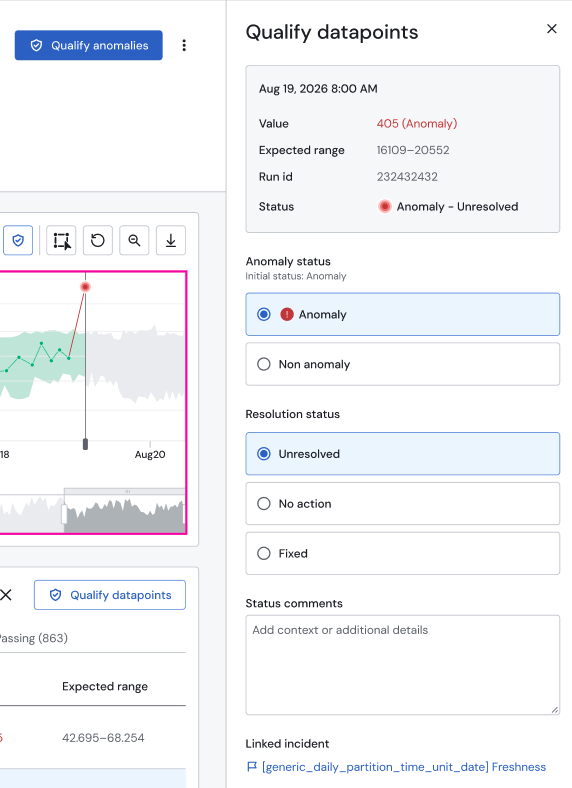
Based on feedback regarding the complexity of our "Feedback Loop," we are simplifying how users interact with our ML-based anomaly detection. We are splitting the qualification of data points into two distinct fields to separate Model Feedback from Operational Resolution.
The Move to Two Separate Statuses
-
Model Feedback (Anomaly Status): "Was the prediction correct?"
- Anomaly: Confirms the model was correct.
- Not an Anomaly: Informs the model that this behavior is expected (e.g., a planned business shift), preventing similar alerts in the future.
-
Resolution Status: "What was done about it?"
- Unresolved: Requires investigation.
- Fixed: The underlying data issue was resolved.
- No Action: The anomaly was real, but no fix is required.
3. Decommissioning "Reviewed" Status
We are decommissioning the "Closed - Reviewed" status for incidents now and later the "Reviewed" qualification for datapoints as part of the datapoints qualifications revamp.
Rationale:
- Removing Ambiguity: "Reviewed" was a neutral tag that didn't clearly indicate if the model was technically accurate or if the data issue was mitigated.
- ML Accuracy: To ensure your dynamic thresholds remain precise, our models require explicit "Correct/Incorrect" feedback rather than neutral markers.
Historical Data Mapping
To ensure a smooth transition, we will automatically map your historical data to the new schema:
| Legacy Qualification | New Anomaly Status | New Resolution Status |
|---|---|---|
| False Positive | Not Anomaly | N/A |
| False Negative | Anomaly | No Action |
| No Action Needed | Anomaly | No Action |
| Reviewed | Not Anomaly | N/A |
| Fixed | • Anomaly if outside confidence band • Not Anomaly if inside confidence band | Fixed |
Next Steps
This revamp is being rollet out in 2 phases:
- Phase 1 (Active): New Incident Details screen.
- Phase 2 (Target end of Q2): Full migration of legacy qualifications to the two-status system.
For any technical questions regarding how these changes affect your processed or integration, please contact your dedicated Solution Engineer or reach out to [email protected]